
AWS
Multi-Account Architecture & Cross-Account Access
By Sagar Panwar · · 4 min read
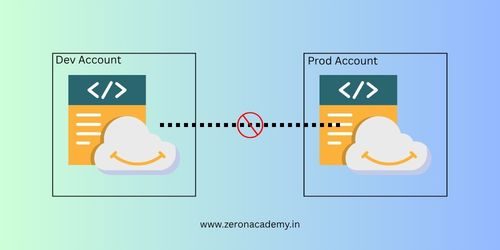
Introduction
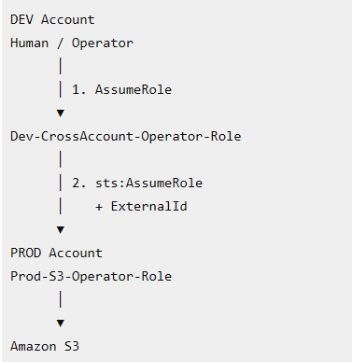
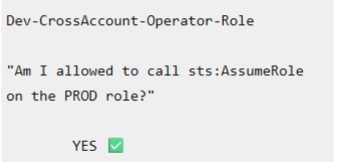
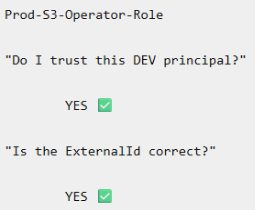
We have two account in our AWS - Dev and Prod. The important lesson is the double handshake: the Dev-side identity must be allowed to call sts:AssumeRole, and the Prod-side role must trust the Dev-side principal. AWS explicitly documents this two-sided requirement for cross-account role assumption.
You'll see ExternalId , which is primarily a protection for third-party/delegated access and the value is not a password or secret. It is an identifier used in the trust policy to help prevent the confused-deputy problem.
Production Security Principles
Double-Handshake Trust: For cross-account role assumption:
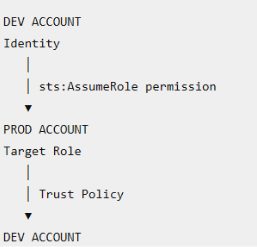
Both sides must permit the assumption.
Confused Deputy Protection: When a role is used for third-party or delegated access, sts:ExternalId can be required in the target role's trust policy.
Correct Principal + Correct ExternalId = AssumeRole allowed
Centralized Identity: A common production architecture is:
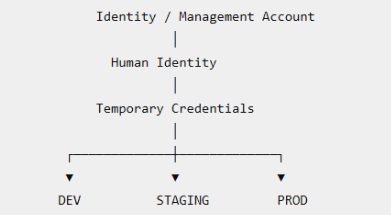
Human identities are centralized while workload accounts remain isolated.
Demo Scenario
We will use two AWS accounts.
| DEV | Account ID: 111111111111 |
|---|---|
| PROD | Account ID: 222222222222 |
The operator is working from the DEV account.
They need temporary read-only access to S3 in PROD.
We will create:
| DEV: | Dev-CrossAccount-Operator-Role |
|---|---|
| PROD: | Prod-S3-Operator-Role (TARGET ROLE) |
The target role will require: ExternalId = ClassroomCrossAccount-2026
Final Architecture
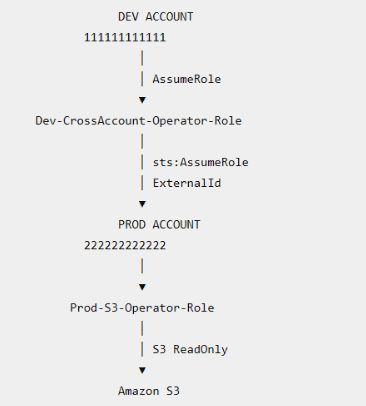
Step 1: Create the Operator Role in DEV.
Log into the DEV account with your administrative identity.
Go to: IAM
- Roles
- Create role (Name: Dev-CrossAccount-Operator-Role)
- Custom trust policy
{
  "Version": "2012-10-17",
  "Statement": [
    {
      "Effect": "Allow",
      "Principal": {
        "AWS": "arn:aws:iam::111111111111:root"
      },
      "Action": "sts:AssumeRole"
    }
  ]
}
This role represents the operator identity in the DEV account.
The Principal is the DEV account, which allows principals in that account to be delegated access to this role.
Step 2 — Give DEV Role Permission to Assume PROD Role
We now tell the DEV role: You are allowed to request sts:AssumeRole for this specific role in PROD.
Create an inline policy on: Dev-CrossAccount-Operator-Role
{
  "Version": "2012-10-17",
  "Statement": [
    {
      "Sid": "AllowAssumeProdRole",
      "Effect": "Allow",
      "Action": "sts:AssumeRole",
      "Resource": "arn:aws:iam::222222222222:role/Prod-S3-Operator-Role"
    }
  ]
}
Important:
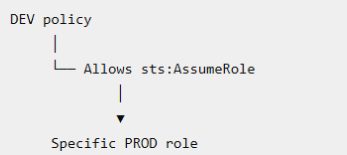
It does not allow assuming every role in PROD.
Step 3 — Create the Target Role in PROD
Now log into the PROD account.
Go to: IAM
- Roles
- Create role (Name: Prod-S3-Operator-Role)
- Custom trust policy
{
  "Version": "2012-10-17",
  "Statement": [
    {
      "Sid": "TrustDevOperator",
      "Effect": "Allow",
      "Principal": {
        "AWS": "arn:aws:iam::111111111111:role/Dev-CrossAccount-Operator-Role"
      },
      "Action": "sts:AssumeRole",
      "Condition": {
        "StringEquals": {
          "sts:ExternalId": "ClassroomCrossAccount-2026"
        }
      }
    }
  ]
}
Notice the two important controls:
Principal → Only Dev-CrossAccount-Operator-Role
ExternalId → Must equal ClassroomCrossAccount-2026
The target role therefore says: I trust this specific role from DEV, but only when the correct ExternalId is supplied.
Step 4 — Attach PROD Permissions
| Attach: | AmazonS3ReadOnlyAccess |
|---|---|
| To: | Prod-S3-Operator-Role |
Architecture:
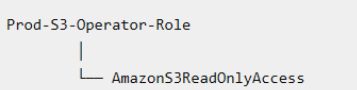
This role does not have administrator permissions. It is only an example of a restricted production role.
Step 5 — Verify the PROD Role
From your PROD admin session:
> aws iam get-role --role-name Prod-S3-Operator-Role
Verify that the role exists and that its trust policy contains: Dev-CrossAccount-Operator-Role
And, sts:ExternalId
Step 6 — Switch to the DEV Operator Role
Return to the DEV account. From your DEV administrator session:
> aws sts assume-role --role-arn arn:aws:iam::111111111111:role/Dev-CrossAccount-Operator-Role --role-session-name CrossAccountDemo
AWS returns temporary credentials:
{
  "Credentials": {
    "AccessKeyId": "ASIA...",
    "SecretAccessKey": "...",
    "SessionToken": "..."
  }
}
Set them in PowerShell:
$env:AWS_ACCESS_KEY_ID="..."
$env:AWS_SECRET_ACCESS_KEY="..."
$env:AWS_SESSION_TOKEN="..."
Then Verify:
> aws sts get-caller-identity
Expected: arn:aws:sts::111111111111:assumed-role/Dev-CrossAccount-Operator-Role/CrossAccountDemo
At this point you are operating as the DEV operator role, not as the administrator.
Step 7 — Test S3 Before Cross-Account Access
Now, you get /Dev-CrossAccount-Operator-Role role - try the following command -
> aws s3 ls
Why? Because,
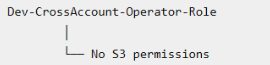
This demonstrates that the DEV role itself does not have S3 access.
Step 8 — Assume the PROD Role
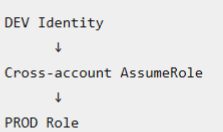
Now perform the cross-account AssumeRole from the Dev-CrossAccount-Operator-Role session. The DEV role will request temporary credentials for the Prod-S3-Operator-Role in the PROD account.
> aws sts assume-role `
--role-arn arn:aws:iam::222222222222:role/Prod-S3-Operator-Role `
--role-session-name ProdAccess `
  --external-id ClassroomCrossAccount-2026
This request contains:
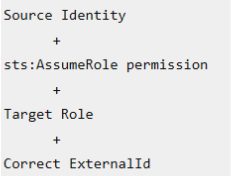
AWS returns another set of temporary credentials. AssumeRole returns temporary access key, secret key, and session token credentials.
Set those credentials:
$env:AWS_ACCESS_KEY_ID="..."
$env:AWS_SECRET_ACCESS_KEY="..."
$env:AWS_SESSION_TOKEN="..."
Step 9 — Verify the PROD Identity
> aws sts get-caller-identity
Expected: arn:aws:sts::222222222222:assumed-role/Prod-S3-Operator-Role/ProdAccess
This proves:
Step 10 — Test PROD S3 Access
> aws s3 ls
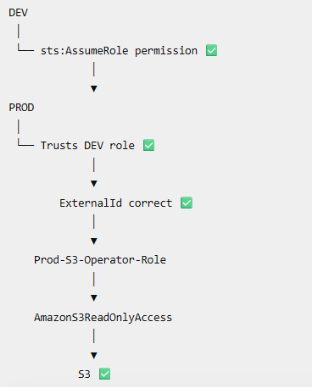
Your PROD S3 buckets. Why did it work?
Test 2 — Wrong ExternalId
This is an important demonstration. From the DEV operator session:
> aws sts assume-role `
--role-arn arn:aws:iam::222222222222:role/Prod-S3-Operator-Role `
--role-session-name WrongExternalId `
  --external-id WrongValue
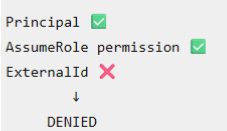
Expected: AccessDenied. Why? The PROD trust policy requires: ClassroomCrossAccount-2026
but the request supplied: WrongValue. Therefore:-
Test 3 — Correct ExternalId
aws sts assume-role `
--role-arn arn:aws:iam::222222222222:role/Prod-S3-Operator-Role `
--role-session-name CorrectExternalId `
  --external-id ClassroomCrossAccount-2026
Expected: Success
The Double Handshake
This is the main concept students should remember.
Handshake 1 — DEV
Handshake 2 — PROD
Only then: Cross-account access = ALLOWED
AWS describes cross-account role assumption as requiring both the trusted account's identity-based permission and the trusting account's role trust policy to allow the request.
- cross-account-access
- multi-account-aws